Published January 9, 2018
Tiny Wins
The big benefits of little changes.

Joel Califa
VP of Continuous Improvement
Over the years, I've worked on many important, large-scale projects, from figuring out high level strategy and blue sky products, to overhauling core flows and IA, to implementing design systems from the ground up.
Working on these big projects can be exhilarating. They're often deemed critical by company leadership and various stakeholders, and it's validating to be trusted with and attached to something so visible and impactful.
I recently shipped two things at GitHub that had an impact beyond my wildest dreams. The amount of gratitude and love that spilled out of the community is like nothing I've seen before. But the things I shipped weren't these huge, meaty projects. They were tiny.
First, we made the favicons for GitHub Pull Request pages dynamic. Now browser tabs will always show a PR's current build status. Before releasing this, users had to periodically click back into tabs to see if their builds had completed so they could continue their work. Impatient users would click back into various PR tabs a lot.
I put together new favicons and Jason worked on implementing the dynamic switch. This change took less than a week, and hundreds of people noticed it immediately. This is just a small sample of the many delighted responses.

Marvin Ramin
@Mauin
The new build status indicators in the favicon of @github pull requests are so handy. And they update their status automatically!
4:26 AM - Oct 30, 2017
10 likes

Tim Head
@betatim
I do love the new @github favicons for pull requests, even when it shows a red cross ❌
6:47 AM - Oct 27, 2017
1 reply7 likes

Seth Michael Larson
@pythoasis
Build status shown in the favicon of GitHub Pull Requests! Such a nice little feature 😊 Thanks @github! 👍
4:59 PM - Oct 27, 2017
1 like

Edward Ocampo-Gooding
@edwardog
@github Loving the new favicon feature in pull requests; helps me work faster and safer
9:53 AM - Oct 27, 2017
1 like

Elena Vilchik
@vilchik_elena
Small but nice new feature from @github made my day! PR status visible in favicon #github #travisci
8:35 AM - Nov 3, 2017
5 likes

Dominik Schilling 🌊
@ocean90
Looks like GitHub added dynamic favicons for build status. 🤖 #littlethings
8:35 AM - Oct 25, 2017
3 retweets26 likes

Devon Zuegel
@devonzuegel
Love that @Github's favicon now shows the status of your CI ❤️
2:23 PM - Oct 26, 2017
1 reply1 retweet13 likes

Yoav Givati
@YoavGivati
The new @github review status favicons are totes adorbs.
12:30 PM - Oct 25, 2017
2 replies1 retweet5 likes

Open Source Hippopotamus🔥🚀
@unicodeveloper
🔥 Design Observation GitHub's Favicon now reflects a PR's status. ❌ Some checks not successful ✅ All checks successful#SmallImprovements #thelittlethings #Software
1:40 PM - Nov 24, 2017
2 replies17 retweets28 likes

Peter Goldsmith
@_petegoldsmith
@github putting PR status in the favicon has changed my life ✅
3:07 AM - Oct 25, 2017 · Camden Town, London
1 like

AlessandroMinoccheri
@minompi
Oh my god! @github put PR favicon for every status! Amazing!!! #github #pullrequest #developers #OpenSource #web
11:41 PM - Oct 24, 2017

Khalid Abuhakmeh
@buhakmeh
I love that @github added the checks to the favicon. The greatness is in the details.
9:34 AM - Oct 25, 2017
1 retweet8 likes

Diego Rodríguez Baquero
@diegorbaquero
Marvin Ramin
@Mauin
The new build status indicators in the favicon of @github pull requests are so handy. And they update their status automatically!
4:26 AM - Oct 30, 2017
10 likes
Seth Michael Larson
@pythoasis
Build status shown in the favicon of GitHub Pull Requests! Such a nice little feature 😊 Thanks @github! 👍
4:59 PM - Oct 27, 2017
1 like
Elena Vilchik
@vilchik_elena
Small but nice new feature from @github made my day! PR status visible in favicon #github #travisci
8:35 AM - Nov 3, 2017
5 likes
Devon Zuegel
@devonzuegel
Love that @Github's favicon now shows the status of your CI ❤️
2:23 PM - Oct 26, 2017
1 reply1 retweet13 likes
Open Source Hippopotamus🔥🚀
@unicodeveloper
🔥 Design Observation GitHub's Favicon now reflects a PR's status. ❌ Some checks not successful ✅ All checks successful#SmallImprovements #thelittlethings #Software
1:40 PM - Nov 24, 2017
2 replies17 retweets28 likes
AlessandroMinoccheri
@minompi
Oh my god! @github put PR favicon for every status! Amazing!!! #github #pullrequest #developers #OpenSource #web
11:41 PM - Oct 24, 2017
Tim Head
@betatim
I do love the new @github favicons for pull requests, even when it shows a red cross ❌
6:47 AM - Oct 27, 2017
1 reply7 likes
Edward Ocampo-Gooding
@edwardog
@github Loving the new favicon feature in pull requests; helps me work faster and safer
9:53 AM - Oct 27, 2017
1 like
Dominik Schilling 🌊
@ocean90
Looks like GitHub added dynamic favicons for build status. 🤖 #littlethings
8:35 AM - Oct 25, 2017
3 retweets26 likes
Yoav Givati
@YoavGivati
The new @github review status favicons are totes adorbs.
12:30 PM - Oct 25, 2017
2 replies1 retweet5 likes
Peter Goldsmith
@_petegoldsmith
@github putting PR status in the favicon has changed my life ✅
3:07 AM - Oct 25, 2017 · Camden Town, London
1 like
Khalid Abuhakmeh
@buhakmeh
I love that @github added the checks to the favicon. The greatness is in the details.
9:34 AM - Oct 25, 2017
1 retweet8 likes
Diego Rodríguez Baquero
@diegorbaquero
My next project was changing the ... indicator on new PR pages to an arrow that indicated merge direction. Before releasing this, people would regularly confuse which branch would be merged into which.

Joel Califa
@notdetails
Ever get confused between your "base" and "compare" branches? Shipped a tiny @github change today that will hopefully clear things up.
before
after
1.3K likes69 repliesView on X
This was a one-line code change that took a few minutes. I didn't even design the arrow—it was already in our icon set.
This tiny change solved a seemingly small frustration, but it turned out to be very significant to many of our users. Again, we saw hundreds of enthusiastic responses and shares.

Nishant Chauhan
@nishant_ch
Replying to @notdetails and 2 others
Thanks, many times i had to Google this so I don't mess up a pull request 😁😂
8:25 AM - Dec 5, 2017
1 like

Bill Sorensen
@BillSorensen
Replying to @notdetails @github
THANK YOU! I've looked that up way too many times.
6:33 AM - Dec 7, 2017
1 like

Filip Hnízdo
@FilipNest
Replying to @notdetails @github
Thank you! Tiny but a huge help to clear up the times I used to spent staring at those two boxes not sure what to do.
5:40 AM - Dec 7, 2017
1 like

Eric CovfefeSchultz
@wwahammy
Replying to @notdetails and 2 others
THANK YOU! I always looked at that for a few seconds longer than should be necessary.
6:45 AM - Dec 5, 2017
1 like

Katie Sylor-Miller
@ksylor
Replying to @notdetails @github
Thank you! It’s amazing what a difference something so small can make!
5:14 AM - Dec 5, 2017
2 likes

SonicFlare
@sonicflare
Replying to @notdetails @github
every fcuking time, for the last 2 years! Thank you!
4:20 AM - Dec 6, 2017

Lasse Rafn
@LasseRafn
Replying to @notdetails and 2 others
Not all heroes wear capes... but you should probably get one! 🙏🏻 Thanks
1:08 PM - Dec 5, 2017
1 like

Shubhodeep Mukherjee
@shubhothegreat
Replying to @notdetails @github
Thanks a lot 😭
6:23 AM - Dec 7, 2017
1 like

jake faris
@jtfaris
Replying to @notdetails @github
WOW this is amazing thank you!!
5:54 AM - Dec 7, 2017
1 like

Eric Bailey
@ericwbailey
Replying to @notdetails @github
nobel prize
3:33 PM - Dec 4, 2017
6 likes

Lee Munroe
@leemunroe
Replying to @notdetails @github
🙌 A Christmas miracle
7:30 AM - Dec 5, 2017 · Potrero, San Francisco
2 likes

Luke Beard
@LukesBeard
Replying to @notdetails @github
bless you!!!
3:31 PM - Dec 4, 2017
2 likes

klepas
@klepas

⚡ Owen
@ow
Replying to @notdetails and 2 others
YES THANK YOU JOEL
Nishant Chauhan
@nishant_ch
Replying to @notdetails and 2 others
Thanks, many times i had to Google this so I don't mess up a pull request 😁😂
8:25 AM - Dec 5, 2017
1 like
Filip Hnízdo
@FilipNest
Replying to @notdetails @github
Thank you! Tiny but a huge help to clear up the times I used to spent staring at those two boxes not sure what to do.
5:40 AM - Dec 7, 2017
1 like
Katie Sylor-Miller
@ksylor
Replying to @notdetails @github
Thank you! It’s amazing what a difference something so small can make!
5:14 AM - Dec 5, 2017
2 likes
Lasse Rafn
@LasseRafn
Replying to @notdetails and 2 others
Not all heroes wear capes... but you should probably get one! 🙏🏻 Thanks
1:08 PM - Dec 5, 2017
1 like
jake faris
@jtfaris
Replying to @notdetails @github
WOW this is amazing thank you!!
5:54 AM - Dec 7, 2017
1 like
Lee Munroe
@leemunroe
Replying to @notdetails @github
🙌 A Christmas miracle
7:30 AM - Dec 5, 2017 · Potrero, San Francisco
2 likes
klepas
@klepas
Bill Sorensen
@BillSorensen
Replying to @notdetails @github
THANK YOU! I've looked that up way too many times.
6:33 AM - Dec 7, 2017
1 like
Eric CovfefeSchultz
@wwahammy
Replying to @notdetails and 2 others
THANK YOU! I always looked at that for a few seconds longer than should be necessary.
6:45 AM - Dec 5, 2017
1 like
SonicFlare
@sonicflare
Replying to @notdetails @github
every fcuking time, for the last 2 years! Thank you!
4:20 AM - Dec 6, 2017
Shubhodeep Mukherjee
@shubhothegreat
Replying to @notdetails @github
Thanks a lot 😭
6:23 AM - Dec 7, 2017
1 like
Eric Bailey
@ericwbailey
Replying to @notdetails @github
nobel prize
3:33 PM - Dec 4, 2017
6 likes
Luke Beard
@LukesBeard
Replying to @notdetails @github
bless you!!!
3:31 PM - Dec 4, 2017
2 likes
⚡ Owen
@ow
Replying to @notdetails and 2 others
YES THANK YOU JOEL
Low effort, high impact
The first of these changes took just under a week and the second took only a few minutes. Both changes affected very small sections of the platform, yet both enjoyed a passionate, almost euphoric reception. Users were excited.
That's not to say that impact can or should be measured by the number of likes received (unlike, say, personal worth). But the individual responses tell a story of how meaningful even the smallest tweak can be to your users.
I can't count how many times I've seen the following graphic in its various forms over the years:
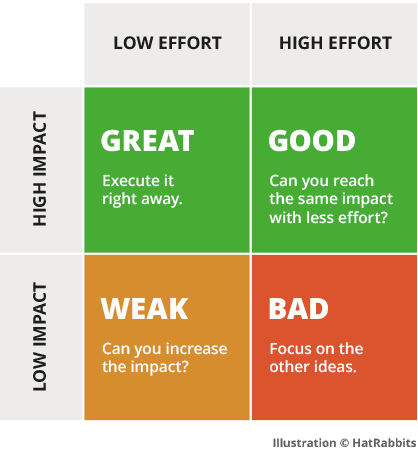
The obvious advice, as seen in this version of it, is to execute on things that take little time and make big dents. Curiously, I haven't seen many organizations actually take this advice to heart. Considering how valuable this type of work can be, I honestly don't understand why.
Let's discuss what changes like this can do for you.
One small change can add up to a big win
High frequency actions (such as creating new PRs on GitHub) take place millions of times a day. A given user might go through the same flow several times per week, per day, or even per hour. These flows become a part of their lives.
If there is even a slight inefficiency or frustration, it compounds with every use. One confusing moment that takes an extra 5 seconds—repeated multiple times a day in perpetuity—adds up to a lot of anxiety and wasted time.
That's why users are so thankful for these tweaks. They understand the significance of all that future time saved.
We can see similar reactions after Netflix added a button that let users skip a TV show's intro sequence. Following this change, users no longer had to scrub back and forth through videos until they landed on the exact start of an episode.

Hayden Kaye 🦕
@hkcorley
Netflix now has a "skip intro" button and I've never been more blessed
8:15 PM - May 30, 2017
1 retweet8 likes

Chase Whitney ⚡💛✨
@chasewhitneyy
The "skip intro" option on Netflix is the best invention tbh
8:06 PM - May 30, 2017
1 like

Timmy Arisa
@timmyarisa
The skip intro button on Netflix is the best thing that has ever happened to me
10:18 AM - May 31, 2017
2 replies3 retweets16 likes

Logan Geiger
@L_Geiger5
Nothing may be more revolutionary than the skip intro button on Netflix
3:50 PM - May 31, 2017
15 likes

Raaaachel
@rrachelsusan
NETFLIX ADDED A SKIP INTRO BUTTON AND IM CRYING
7:36 PM - Mar 18, 2017
2 likes

shaiz
@shaizahh
The "Skip Intro" button on Netflix has changed my life
8:05 PM - May 30, 2017
5 likes

DeanoG
@deanog
Give a Nobel Prize to whoever invented the “Skip Intro” button on Netflix. The greatest thing when you’re having a binge.
3:26 AM - May 31, 2017
3 likes

Sara
@SaraTheKabyle
Who ever invented the "skip intro" button on Netflix deserves a Nobel Prize 👏
11:00 AM - Mar 27, 2017
1 reply1 like

gargi pandey
@garg1p
I nominate the inventor of Netflix's 'skip intro' button for a Nobel Prize

🌙
@linetteparaiso
the netflix “skip intro” button deserves a Nobel Prize
9:12 PM - Nov 15, 2017
27 retweets31 likes
Hayden Kaye 🦕
@hkcorley
Netflix now has a "skip intro" button and I've never been more blessed
8:15 PM - May 30, 2017
1 retweet8 likes
Timmy Arisa
@timmyarisa
The skip intro button on Netflix is the best thing that has ever happened to me
10:18 AM - May 31, 2017
2 replies3 retweets16 likes
Raaaachel
@rrachelsusan
NETFLIX ADDED A SKIP INTRO BUTTON AND IM CRYING
7:36 PM - Mar 18, 2017
2 likes
DeanoG
@deanog
Give a Nobel Prize to whoever invented the “Skip Intro” button on Netflix. The greatest thing when you’re having a binge.
3:26 AM - May 31, 2017
3 likes
gargi pandey
@garg1p
I nominate the inventor of Netflix's 'skip intro' button for a Nobel Prize
Chase Whitney ⚡💛✨
@chasewhitneyy
The "skip intro" option on Netflix is the best invention tbh
8:06 PM - May 30, 2017
1 like
Logan Geiger
@L_Geiger5
Nothing may be more revolutionary than the skip intro button on Netflix
3:50 PM - May 31, 2017
15 likes
shaiz
@shaizahh
The "Skip Intro" button on Netflix has changed my life
8:05 PM - May 30, 2017
5 likes
Sara
@SaraTheKabyle
Who ever invented the "skip intro" button on Netflix deserves a Nobel Prize 👏
11:00 AM - Mar 27, 2017
1 reply1 like
🌙
@linetteparaiso
the netflix “skip intro” button deserves a Nobel Prize
9:12 PM - Nov 15, 2017
27 retweets31 likes
We can see more responses along the same lines after Chrome released a volume icon that indicated which tabs were making noise. Following this change, users no longer had to click into every open tab to find the source of their discomfort.

Kaitlyn B
@KaitlynBajakian
CAN WE JUST TALK ABOUT HOW GOOGLE CHROME SHOWS YOU WHICH TAB THE SOUND IS COMING FROM. The future is now
2:25 PM - Jan 9, 2014
1 like

Mode 7 - Paul Kilduff-Taylor
@mode7games
whoever implemented the little speaker icon that shows when a chrome tab is playing audio I LOVE YOU
7:49 AM - Jan 31, 2014
3 replies7 retweets9 likes

Emily✨
@emilyxrose97
Oh my god google chrome updated and it tells you what tab is playing audio THIS CHANGES EVERYTHING
9:14 PM - Jan 8, 2014

Joshua Doyle
@audoyle
How long has Chrome shown a little loudspeaker on the tab playing audio? That's my new favourite thing EVER!!!! #sohappy
11:25 AM - Jan 31, 2014

Some Kind Of Benjamin
@BJKWhite
Chrome is putting a little speaker icon on the very tab that music is coming from and I am FREAKING OUT at what an amazing idea that is.
6:30 PM - Jan 8, 2014

Marko Kloos
@markokloos
Whoever is responsible for the new icons on Chrome tabs that alert you to which tab currently plays sounds: NOBEL PEACE PRIZE, at a minimum.
5:44 AM - Jan 20, 2014
18 retweets8 likes

Evan Condry
@evancondry
Officially nominating for the Nobel Prize the Chrome designer who put a little speaker icon in the tab that's playing sound.
11:36 AM - Jan 27, 2014
1 like

Hayes Brown
@HayesBrown
Google Chrome started adding little speakers to tabs that have something playing, which I think qualifies them for a Nobel Peace Prize.
7:57 AM - Jan 9, 2014
14 retweets15 likes

Alex Bitz
@alexbitz
To the Google engineer that added a speaker icon to Chrome

Stuart Smith
@iamStuartSmith
A little icon comes up on any Google Chrome tab where music is
Kaitlyn B
@KaitlynBajakian
CAN WE JUST TALK ABOUT HOW GOOGLE CHROME SHOWS YOU WHICH TAB THE SOUND IS COMING FROM. The future is now
2:25 PM - Jan 9, 2014
1 like
Emily✨
@emilyxrose97
Oh my god google chrome updated and it tells you what tab is playing audio THIS CHANGES EVERYTHING
9:14 PM - Jan 8, 2014
Some Kind Of Benjamin
@BJKWhite
Chrome is putting a little speaker icon on the very tab that music is coming from and I am FREAKING OUT at what an amazing idea that is.
6:30 PM - Jan 8, 2014
Evan Condry
@evancondry
Officially nominating for the Nobel Prize the Chrome designer who put a little speaker icon in the tab that's playing sound.
11:36 AM - Jan 27, 2014
1 like
Alex Bitz
@alexbitz
To the Google engineer that added a speaker icon to Chrome
Mode 7 - Paul Kilduff-Taylor
@mode7games
whoever implemented the little speaker icon that shows when a chrome tab is playing audio I LOVE YOU
7:49 AM - Jan 31, 2014
3 replies7 retweets9 likes
Joshua Doyle
@audoyle
How long has Chrome shown a little loudspeaker on the tab playing audio? That's my new favourite thing EVER!!!! #sohappy
11:25 AM - Jan 31, 2014
Marko Kloos
@markokloos
Whoever is responsible for the new icons on Chrome tabs that alert you to which tab currently plays sounds: NOBEL PEACE PRIZE, at a minimum.
5:44 AM - Jan 20, 2014
18 retweets8 likes
Hayes Brown
@HayesBrown
Google Chrome started adding little speakers to tabs that have something playing, which I think qualifies them for a Nobel Peace Prize.
7:57 AM - Jan 9, 2014
14 retweets15 likes
Stuart Smith
@iamStuartSmith
A little icon comes up on any Google Chrome tab where music is
Nobel prizes all around.
There are many more examples of this kind of overwhelming gratitude following similar tweaks. The changes may seem minor, but they resolved frustrations that were experienced over and over by millions of users.
Imagine that one of your 20 Chrome tabs is currently auto-playing the most obnoxious video on the entire internet. The way you solve this is by trial-and-error clicking through every single tab. You didn't find it the first time. How is that possible? Ugh, maybe you clicked into it without noticing. Let's try again and again until finally, defeated, you close your entire browser. Rinse and repeat tomorrow and every other day for the foreseeable future.


A dramatized reenactment.
Compare that to the experience of just closing the tab with the noise icon.


You can think of the aforementioned changes as shortcuts. The intermediate steps (randomly clicking through your many tabs to find the source of your pain, or racking your brain for which git branch merges into which so you don't accidentally break your company) are small paper cuts, but they add up. These changes get rid of them.
Getting your personal pet peeve fixed is powerful, often more so than new, more substantial features. Think about all that cumulative impact resulting from such little effort.
This is what I call a Tiny Win.
Tiny Wins can strengthen your business
Let's get this out of the way: large projects are important. If a company wants to continue innovating, tiny iterations like the ones above don't quite cut it. So, to be clear, I'm not suggesting we begin planning roadmaps around these Tiny Wins. Ambitious projects should lead the way.
But large scale projects demand coordination, diligence, and—most of all—time. These things don't happen overnight. In the time it takes to ship something of substance, a product can begin to feel stagnant. For a startup (especially one with viable competition) that stagnation can spell death.
To combat this, companies have to create an atmosphere of momentum, and prove to their users that they're both listening and improving. They need to fill the long gaps between ambitious launches with smaller ships.
Many companies try to strike a balance by building MVPs and iterating from there. This, ideally, provides users with regular value along every step of the way. But each of these steps can still take anywhere from a two-week sprint to several months—and the output of each step is not always inherently valuable. It's often the next small thing on the way to a more complete product.
In contrast, the various improvements I listed above are all self-contained. Netflix's "skip intro" button is significant to users in itself. As is Chrome's noise indicators and GitHub's dynamic favicons.
Because of this, these changes were perceived and acknowledged as fresh, complete features. They communicated to users that they were being listened to. These features bred excitement, goodwill, and likely loyalty towards their respective companies. Hell, they probably even contributed to some organic growth.
MVPs and iteration are powerful tools that should be leveraged by companies looking to move quickly. But Tiny Wins are much more potent when it comes to filling the gaps, improving retention, and nurturing your community of users.
Make Tiny Wins work for you
OK, so Tiny Wins are great and they have this cute name to boot. Obviously you're sold on this. The next step, then, is to leverage them regularly and reap the rewards.
Now, your first instinct might be to open up your user feedback channels and start prioritizing issues. I'd caution against this.
I noticed something weird about the issues we solved with these changes. They were almost never reported.
Hundreds of people were ecstatic when we added that arrow to PR pages. Out of those, not a single one indicated that this flow was confusing. A lot of people assumed it was their own fault for not just "getting" it.

Hendra Susanto
@benhanks040888
Replying to @notdetails @github
One of the problems I know I have but I thought only I have it.
10:00 AM - Dec 5, 2017
1 like

Darryl D.
@darryldexter
Replying to @notdetails @github
I knew I wasn't alone! It drove me crazy. Thanks!
9:05 PM - Dec 5, 2017
Hendra Susanto
@benhanks040888
Replying to @notdetails @github
One of the problems I know I have but I thought only I have it.
10:00 AM - Dec 5, 2017
1 like
Darryl D.
@darryldexter
Replying to @notdetails @github
I knew I wasn't alone! It drove me crazy. Thanks!
9:05 PM - Dec 5, 2017
Others get so accustomed to these flows that they don't even notice their anxiety. If they do, it's just part of life. The status quo. Something to live with, not improve.
How many people recognized the act of scrubbing a video to find the start of an episode as improvable? How many people thought to ask the Chrome team to solve their noisy tab problems?
Something something faster horses.
—Henry Ford
The lesson here is that you can't trust your users to bubble up the small stuff, which as we've seen can often be the best stuff to build). This means that you can't exclusively rely on existing user feedback and tickets. You need to dig deeper.
Make a list, check it twice
Making a list of quick wins isn’t hard, but making sure that what you’re building is worth the effort can be trickier. Not every opportunity will have the kind of impact we saw above, and that’s what Tiny Wins are all about.
Tiny Wins are standalone. These changes are small, scoped, and provide their own value. If the change can't be appreciated on its own, it doesn't belong on the list.
Tiny Wins are low effort. These projects are straightforward, scoped, and takes a short amount of time. If the change requires a significant amount of time and effort, it doesn't belong on the list.
Tiny Wins are high impact. They affect things that the majority of users interact with on a regular basis. If the change won't have the compounding effects we've discussed, it doesn't belong on the list. This means that something like addressing your system's dark corners, while important and worthwhile, is not right for this list.
Tiny Wins are often shortcuts. They save a user's time by getting rid of existing steps—physical or mental—required to perform an action. This is a really useful way to think about the types of changes we saw above, and a good way to differentiate them from other low-hanging fruits that don't belong on your lists. At least initially, users will still remember the frustrating experiences they once had to deal with. They'll remember them viscerally. That's where the love comes from.
So start by setting up a meeting with as many perspectives as you can. Designers, Developers, PMs, Customer Success, and Support staff all have equally valuable insights here, but anyone with a finger on the pulse of your user base is especially important. Ask yourselves:
- What are your product's most frequently used flows?
- What about those flows is frustrating? What regularly takes up time or cognitive load? This could be an extra click or an ambiguous component.
- How frustrating are these moments? What is the sum of time or frustration that fixing each of these small things will save? How many users would be affected?
- Will it be noticeable? Will it be shareable? Will it create joy?
Fresh eyes are extremely useful when it comes to answering these questions. I'd only been at GitHub for a few months when I added the arrow to the PR page, and I did that because it just didn't make sense to me.
Designers, like users, get used to their product and its various quirks. In time, it can become increasingly difficult to see what could be improved. So try to include new employees in this process. Make it a part of your team's on-boarding. And nurture an atmosphere that encourages your team to continue questioning the status quo even as they get to know the product.
Once you've populated the initial list, you can validate individual items with users and prioritize them based on effort/impact, as you would anything else.
Now do the things on the list
Every organization is different, so there isn't a universal process that'll work for everything. What I can say is that the key element to make this work is a regular cadence. This is what will create a sense that the company is listening and moving quickly. This is what will breed trust in your user base.
- Include a Tiny Win in every sprint, or fill your downtime by picking items off the list. Make sure these tweaks are shipped frequently.
- Keep the list alive by including new people, adding new items to it, revalidating it, and reprioritizing it often.
- Make it a point to include your social media managers early in the conversation. Highlighting these features the right way is extremely important, and also fun!
That's it. Not exactly rocket science. Not exactly novel. But very powerful.
I believe that getting into the habit of shipping Tiny Wins can do wonders for your brand. It can set you apart from competitors. It can show your users that you're listening to them and that they can trust you. It can turn those same users into promoters, boost your NPS, and lead to organic growth. Most importantly, it'll make your product, and the lives of your users, that much better.
Imagine all of that for such a tiny amount of ongoing effort.
So... what can you fix today?